
How to Distribute Music to Beatport: Step-by-Step Guide 2026
Table of Contents
- Why You Cannot Upload Directly to Beatport
- Understanding Digital Music Aggregators and Distribution Partners
- Best Music Distributors for Electronic Music
- Beatport Distribution Requirements and Genre Eligibility
- Step-by-Step: How to Distribute Music to Beatport
- Beatport Release Timeline: What to Expect
- How to Get Signed to a Label for Beatport Distribution
- Beatport Hype and Charting Strategies
How to Distribute Music to Beatport: Step-by-Step Guide
Last Updated: July 10, 2026
Getting your music in front of electronic music fans requires understanding how to distribute music to Beatport. The platform doesn't accept direct uploads, you need a distribution partner to act as your intermediary. According to Beatport's official platform documentation, only music distributed through approved aggregators reaches their catalog. The right distribution strategy gets your tracks in front of tastemakers, DJs, and music buyers who actively use Beatport to discover and purchase new releases.
Why You Cannot Upload Directly to Beatport
Beatport operates a curated marketplace model and doesn't accept direct submissions from individual artists or labels. By requiring music to flow through vetted aggregators, Beatport enforces consistent audio mastering specifications, ISRC code requirements, and artwork standards without managing thousands of individual accounts. Your only path to Beatport distribution is through a digital music aggregator with direct API connections to Beatport's submission system.
Understanding Digital Music Aggregators and Distribution Partners
A digital music aggregator takes your finished tracks, validates them against platform-specific requirements, and delivers them to multiple streaming and sales platforms simultaneously. Unlike traditional record labels, aggregators don't take creative control or ownership of your music. You retain 100% of your music rights and typically receive 85-100% of revenue after their service fee.
How Aggregators Connect Your Music to Beatport
When you upload your release to an aggregator, their system validates your audio files against Beatport's technical specifications: 24-bit WAV files at 44.1 kHz or 96 kHz sample rate, with proper loudness levels between -14 and -6 LUFS. The aggregator checks your metadata for consistency and completeness, then submits your release to Beatport's curation team. Approval typically takes 1-3 weeks.
The aggregator also generates and assigns ISRC codes (International Standard Recording Codes) and UPC codes, ensuring your music is properly tracked across all sales channels and royalty reporting systems.
The Role of Label Accounts vs. Independent Artist Accounts
Beatport distinguishes between label accounts and independent artist accounts. A label account is typically used by established record labels with multiple artists and releases, while an independent artist account is for solo artists or small collectives. Most aggregators allow you to choose which account type your release will appear under.
Best Music Distributors for Electronic Music
Choosing the right aggregator is critical because different services have different strengths. TuneCore offers unlimited releases with a flat annual fee and detailed sales reporting. TooLost focuses specifically on underground electronic music with strong connections in the techno and house communities. iMusician provides transparent royalty splits and lower fees for high-volume releases.
NexaTunes stands apart by offering unlimited sublabels at no additional cost, making it ideal for labels managing multiple artists or sounds. You get monthly royalty payouts and detailed label-level reporting showing exactly which tracks are selling on Beatport. Direct access to Beatport means your releases are prioritized in the approval queue, reducing wait times from weeks to days.
Beatport Distribution Requirements and Genre Eligibility
Beatport accepts music across multiple electronic dance music genres designed for DJs and club environments: techno, house, trance, drum and bass, dubstep, and related genres. Lo-fi hip-hop, ambient music, and other electronic genres that aren't DJ-oriented are typically rejected.
Before submitting, verify that your music fits Beatport's genre taxonomy. Misgenering your music is one of the most common reasons for rejection.
Technical Specifications: Audio Mastering, WAV Files, and Metadata
Your audio files must meet exact technical specifications or your release will be rejected. Beatport requires 24-bit WAV files at either 44.1 kHz or 96 kHz sample rate. Audio mastering is critical, your master should peak at -3 dB to -6 dB on the loudest transient, with integrated loudness between -14 and -6 LUFS.
Metadata must be complete and accurate: artist name, track title, featuring artists, producer credits, songwriter credits, and copyright year. Inconsistent metadata is a common rejection reason.
ISRC Codes and UPC Codes Explained
An ISRC code (International Standard Recording Code) is a unique identifier for each individual recording. A UPC code (Universal Product Code) identifies the release as a whole. Beatport requires both for proper royalty tracking and sales reporting. If you don't have them, your aggregator will generate them automatically.
Step-by-Step: How to Distribute Music to Beatport
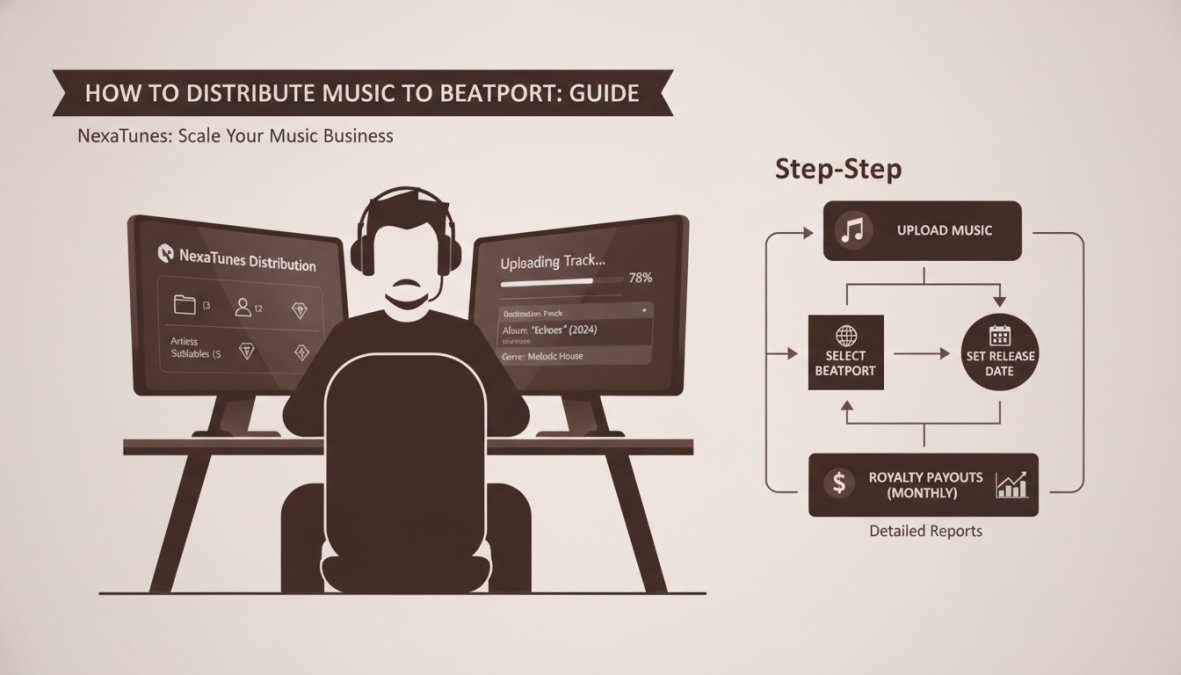
The process of getting your music to Beatport follows a consistent workflow regardless of which aggregator you choose.
Step 1: Prepare Your Tracks and Metadata
Export your master in 24-bit WAV format at 44.1 kHz (or 96 kHz if your production was at that sample rate). Check the loudness using a metering plugin, aiming for -14 to -6 LUFS integrated loudness. Create a metadata spreadsheet with all required information: artist name, track title, featuring artists, producer credits, songwriter credits, and genre. Be consistent across all tracks.
Prepare your artwork: a 3000x3000 pixel JPEG or PNG image in RGB color space. Low-resolution or blurry artwork is a common rejection reason.
Step 2: Choose Your Distribution Partner
Select an aggregator based on your needs. If you're a solo artist releasing occasionally, TuneCore or TooLost work well. If you're running a label or planning multiple releases, NexaTunes offers better scalability with unlimited sublabels and superior reporting.
Sign up for an account and complete your profile with your artist or label name, contact email, and payment details for royalty deposits.
Step 3: Create Your Account and Upload Portal Access
Log into your aggregator account and navigate to the upload section. Select "Single" if you're uploading one track, or "EP/Album" if you're uploading multiple tracks as a cohesive release. Make sure Beatport is checked among the platforms to distribute to.
Step 4: Submit Your Release with Correct Metadata
Upload your WAV file and artwork. Fill in all metadata fields: artist name, track title, genre, BPM, key, and any featuring artists or credits. Double-check everything for spelling and consistency. If you have existing ISRC codes, enter them; otherwise, let the aggregator generate new ones.
Select your release date, most aggregators require at least 2-3 weeks notice before your release date to allow time for processing and curation review.
Step 5: Set Your Release Date and Exclusive Releases
Choose your release date strategically, considering the electronic music calendar and relevant events that drive DJ interest. Some aggregators offer "exclusive release" options where your music is exclusive to Beatport for a set period before rolling out to other platforms. For most independent artists, a wide release across all platforms simultaneously is more effective.
After submission, your release enters the aggregator's queue. You'll receive email updates as it moves through validation, curation review, and final approval.
Beatport Release Timeline: What to Expect
From submission to live release, the timeline typically spans 3-6 weeks. Immediately after submission, the aggregator validates your files and metadata (2-3 days). If there are issues, you'll receive a notification with specific corrections needed.
Once validation passes, your release enters Beatport's curation queue, where Beatport's team listens to your track and decides whether it meets their quality and genre standards. This stage typically takes 1-3 weeks. If approved, your release is scheduled for the official release date you selected.
Troubleshooting Rejected Releases
The most common rejection reasons are: audio quality issues (too loud, distorted, or poorly mastered), metadata errors (inconsistent artist names, misspelled titles), artwork problems (low resolution, wrong color space), or genre mismatch.
Ask your aggregator for feedback on the rejection. Analyze your submission against the requirements: is your audio properly mastered? Is your metadata consistent? Does your genre selection match your music? Resubmit with corrections using the same ISRC and UPC codes.
| Rejection Reason | Solution | Timeline |
|---|---|---|
| Audio too loud or distorted | Re-master to -14 to -6 LUFS | 3-5 days |
| Metadata inconsistencies | Correct artist names and titles | 1 day |
| Artwork low resolution | Create new 3000x3000 pixel image | 1-2 days |
| Genre mismatch | Re-categorize or resubmit as different genre | 1 day |
| Overall quality issues | Work with mastering engineer | 1-2 weeks |
How to Get Signed to a Label for Beatport Distribution
While distributing independently through an aggregator is straightforward, getting signed to an established label offers different advantages: professional marketing, playlist placement, and credibility within the electronic music community.
Label A&R teams actively scout Beatport, Traxsource, and SoundCloud for new talent. If your independent releases perform well on Beatport, strong sales, consistent streams, positive feedback from DJs, label interest follows naturally. To attract label attention, focus on consistent releases, professional production quality, and genuine engagement with the electronic music community.
Label Management and Sublabel Strategies
If you're running your own label, sublabel strategies become important. A sublabel is a separate imprint under your main label, useful for different sounds or artist rosters. NexaTunes supports unlimited sublabels at no additional cost, allowing you to organize releases by sound while maintaining consolidated reporting.
Music Rights and Royalties on Beatport
When your music sells on Beatport, the platform takes a percentage (typically 30-50%), and the remainder goes to your aggregator, which takes its cut before paying you. Royalties are typically paid monthly, with a slight delay. Your aggregator provides detailed reporting showing which tracks sold, on which platforms, and how much revenue each generated.
Ensure you own or control the rights to any music you distribute. If you're distributing a remix, get explicit permission from the original copyright holder. If you're featuring another artist, clarify who owns the recording rights.
Beatport Hype and Charting Strategies
Beatport's Hype Chart tracks the most-added and most-charted tracks across different genres. Getting your release onto the Hype Chart significantly increases visibility and sales. The Hype Chart is driven by DJ activity: when DJs purchase and add your track to their collections, the platform tracks it.
To drive Hype Chart performance, promote your release to DJs directly. Build relationships with DJs in your genre, send them advance copies, and ask for support. When DJs purchase your track on Beatport, it registers as a chart point. Coordinating a launch day where multiple DJs purchase simultaneously creates momentum.
Beatport's editorial team also factors into chart placement. If they feature your release in genre-specific playlists or the homepage, visibility increases dramatically. Pricing strategy also affects chart performance, pricing your track at $1.49 instead of $2.49 lowers the barrier for DJs to purchase, which can increase sales volume and chart position.
Getting your music on Beatport requires understanding the platform's specific requirements, choosing the right distribution partner, and executing a thoughtful release strategy. NexaTunes is designed specifically for labels and serious independent artists who need transparent reporting, unlimited sublabels, and reliable monthly payouts. With direct Beatport access and detailed label-level analytics, you gain visibility into exactly which tracks resonate with DJs and music buyers.
Frequently Asked Questions
Can I upload music directly to Beatport myself?
No, you cannot upload music directly to Beatport. Beatport only accepts submissions through official digital music aggregators and distribution partners. These aggregators manage your track delivery, metadata, and catalog placement. You must use a music distribution platform like TuneCore, iMusician, or similar partners to submit your music to Beatport's platform.
What are Beatport's distribution requirements for electronic dance music?
Beatport has specific Beatport distribution requirements for EDM and electronic music. Your tracks must be properly mastered WAV files, include complete metadata (artist name, track title, release date), valid ISRC and UPC codes, and be submitted in genre-eligible formats. The Beatport catalog prioritizes high-quality production, proper genre classification, and professional audio specifications to maintain curation standards.
How long does it take for music to appear on Beatport after submission?
The Beatport release timeline typically ranges from 2-4 weeks after submission through your distribution partner. However, this depends on Beatport's curation process and quality control standards. Some releases may appear faster if they meet all requirements immediately, while others may require revisions. Your aggregator will notify you of any issues during the review period.
Do I need a record label to distribute music to Beatport, or can I release as an independent artist?
You can distribute music to Beatport as an independent artist without a record label. However, you'll need to use a music aggregator or distribution partner to submit your tracks. Independent artists and labels both use these platforms. The key difference is label accounts may offer additional features like unlimited sublabels and advanced artist management, while independent artists typically use standard submission pathways.
Editorial Transparency: This article was created with the assistance of GrandRanker AI and reviewed, edited, fact-checked, and approved by the NexaTunes editorial team before publication.
“If you’re looking for a reliable way to distribute your music to Major Platforms , NexaTunes offers direct distribution with transparent terms.